Context
The Purdue Office of Undergraduate Research (OUR) supports students in finding, funding, and completing research projects across campus. While the office had developed a detailed printed pathway explaining the steps from discovering opportunities to presenting research, students still struggled to navigate the web experience.
Our Experience Studio team was tasked with designing a guided web pathway that translates this print artifact into an interactive experience. The goal was to align the website with how students actually search for research, while preserving the clarity and structure of the original pathway.
Team & My Role
This project was completed as part of Purdue’s Experience Studio, in collaboration with the Office of Undergraduate Research. Our nine-person team included students with strengths in research, interaction design, content strategy, and visual design.
Within the team, I focused on research synthesis, interactive prototyping, and documentation:
- Helped shape interview protocols and current-state tasks based on the printed pathway.
- Co-led synthesis activities like affinity diagramming and insight clustering.
- Led the interactive prototype workstream from low-fidelity through high-fidelity, translating team-defined flows into concrete interactions.
- Contributed to the design documentation and annotated user flow by capturing how interaction patterns support the broader pathway strategy.
The Problem
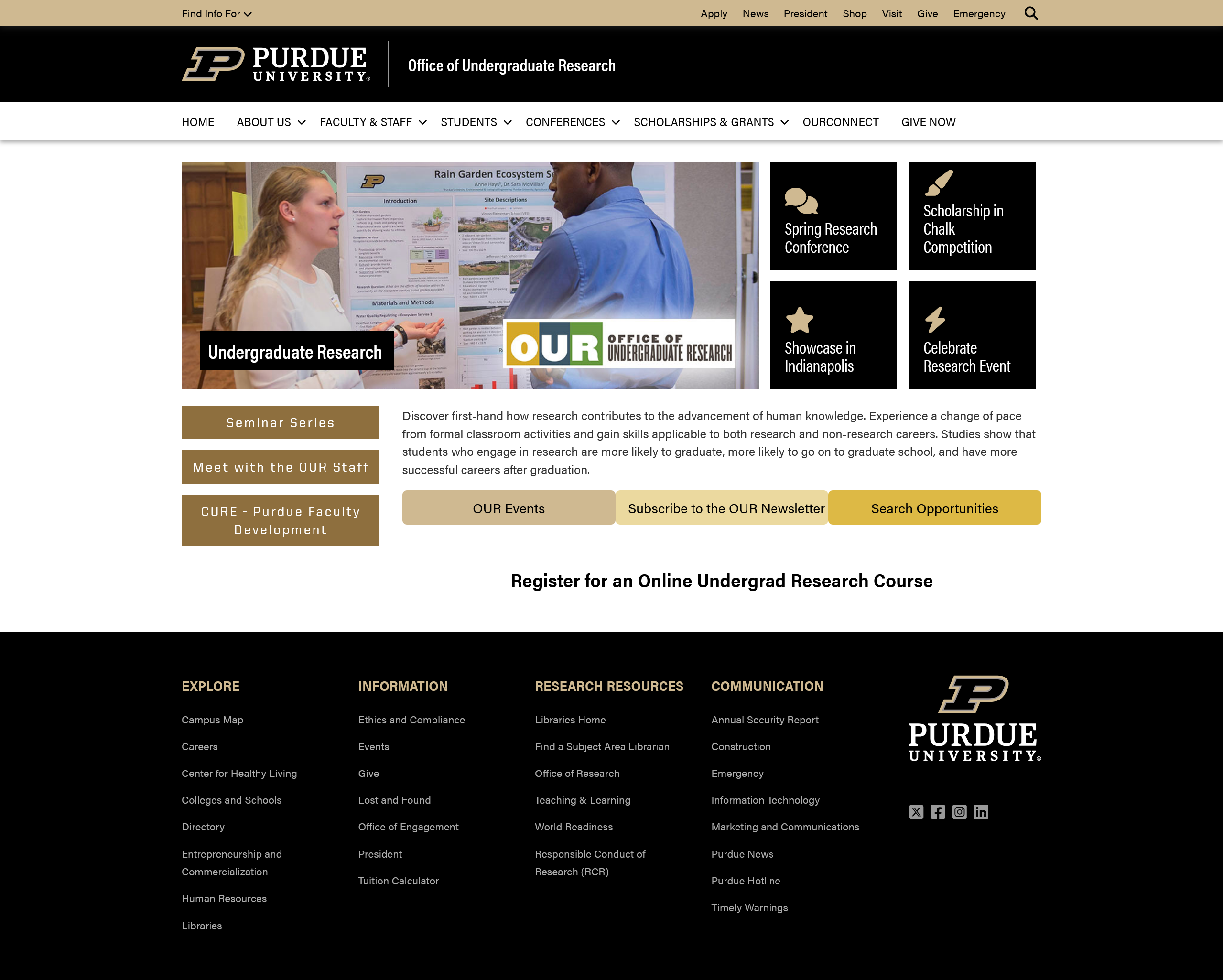
Students knew that Purdue OUR existed, but the digital experience made it difficult to act on that awareness. The pathway looked clear on paper, yet the website felt scattered, text-heavy, and hard to navigate—especially for students with little or no research experience.
- Unclear starting points - A single “Get Started” entry point did not reflect the different goals of new, returning, and advanced student researchers.
- Hidden information - Key resources like OURConnect, staff contact info, and funding details were buried in dropdowns or external links.
- Inconsistent project details - Opportunities were listed, but content and structure varied, making it hard to compare options or understand requirements.
- Underused support resources - Students expected guides, FAQs, and step-by-step help, but struggled to find them in the current layout.

The existing undergraduate research pathway infographic that students struggled to translate into web actions.
Students weren’t just missing information—they were missing orientation. The website needed to act as a guide through the research journey, not just a collection of links.
Understanding the Current Experience
User & Stakeholder Interviews
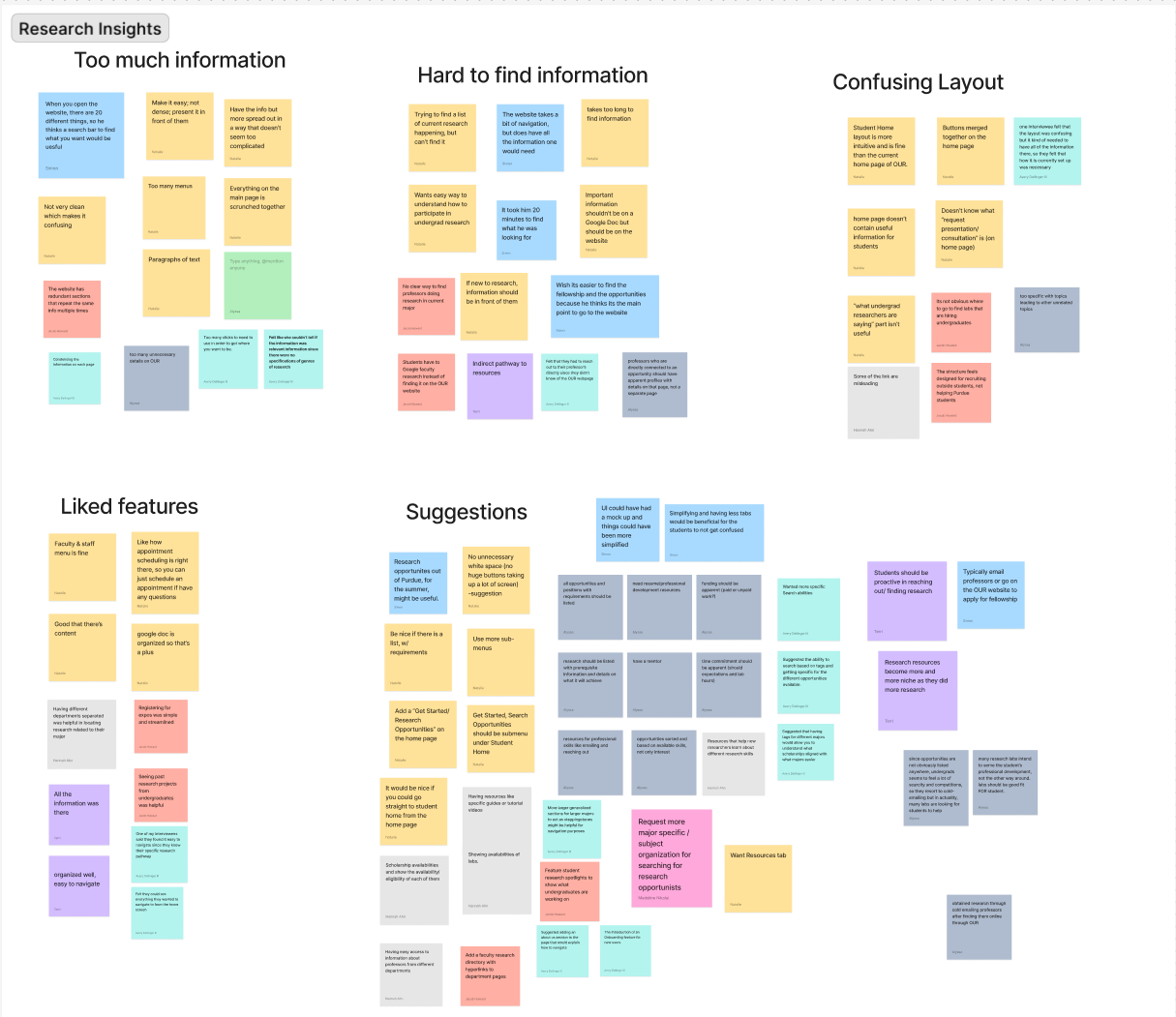
We interviewed 11 undergraduate and 3 graduate students who had engaged with research at Purdue. Graduate students helped us understand the broader research process and reflect on their own undergraduate journeys.
- Students appreciated that OUR listed many research topics and departments, but felt overwhelmed by scattered information.
- External documents and long pages slowed them down; they preferred short, scannable navigation with clear labels.
- Faculty contact info and research opportunities were often hidden in dropdowns or external portals, making discovery feel like trial and error.
- Students expected supplemental resources (guides, FAQ, examples) that explained how to apply, present, and stay involved in research.
Comparative Analysis
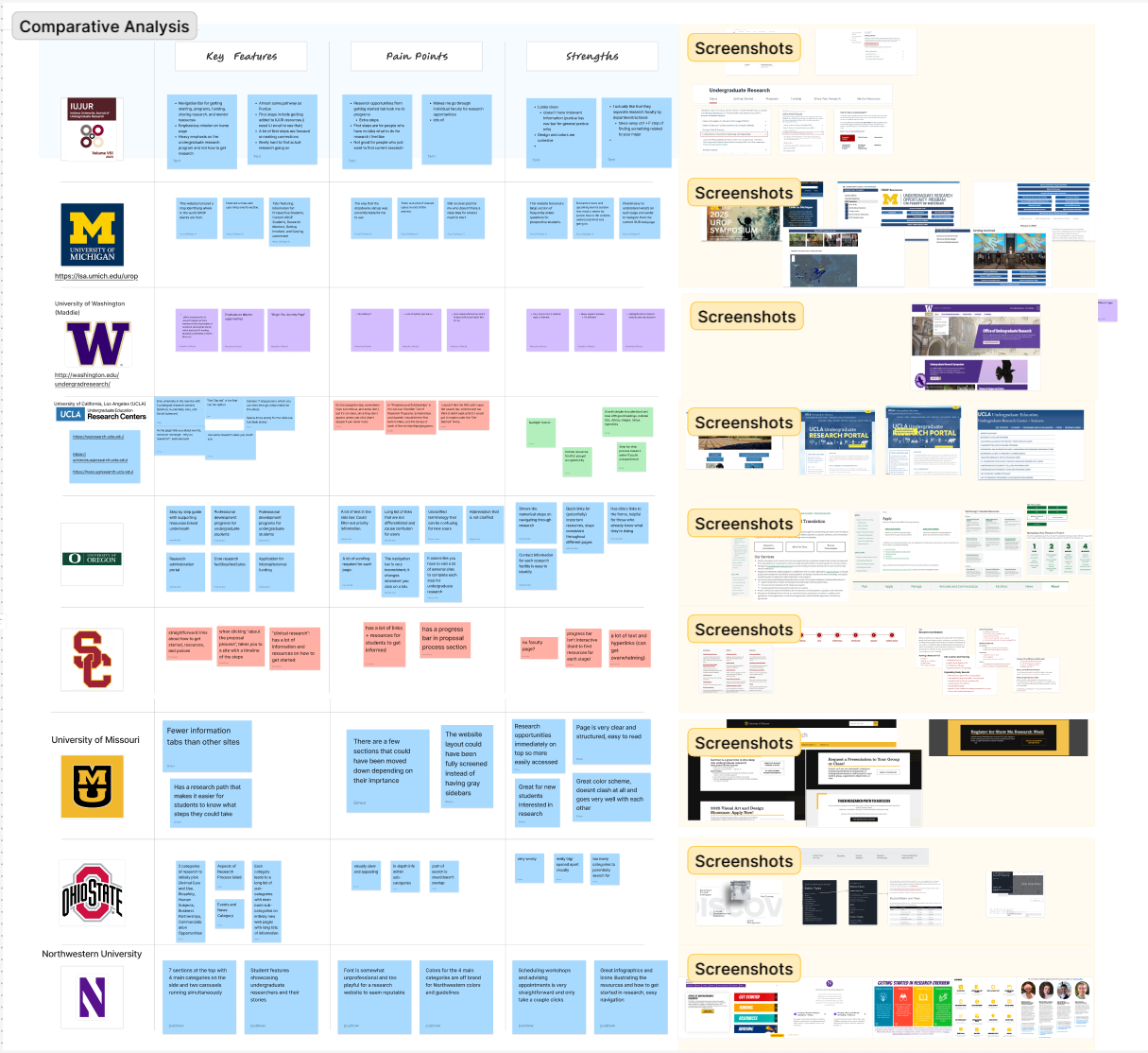
To avoid re‑inventing the wheel, we benchmarked Purdue OUR against peer institutions in the Big Ten and beyond, including Northwestern, UCLA, Washington, and others.
- Minimalist layouts made opportunities easier to scan and reduced cognitive load.
- Clear “start here” entry points differentiated audiences (new researchers, returning students, faculty).
- Well-structured opportunity catalogs surfaced filters (topic, time commitment, department) up front.
- Dedicated FAQ and resource hubs were easy to find and broken into digestible sections.
Current State Testing
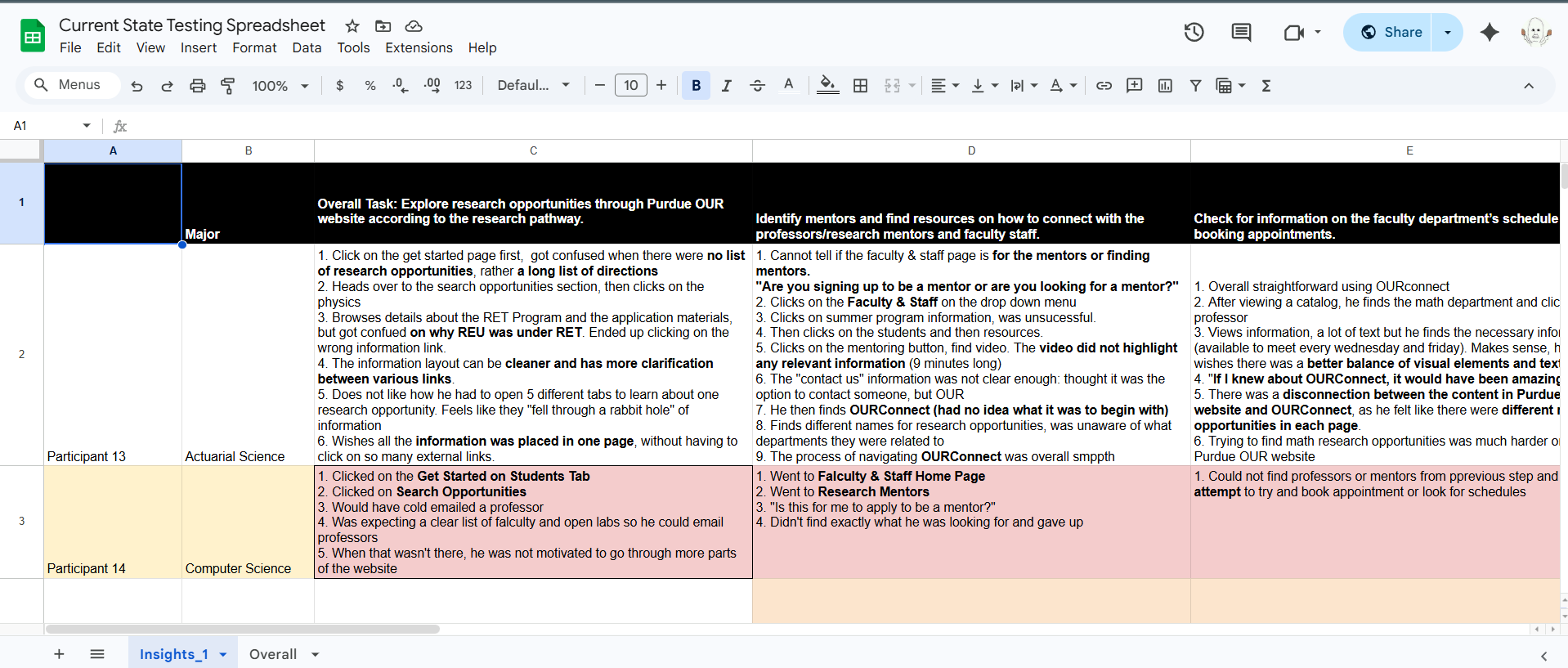
We ran current state tests with 10 undergraduates using the existing Purdue OUR website, asking them to complete tasks derived from the print pathway while thinking aloud.
- Students entered the site with different goals (finding a mentor, funding, conferences), but were all funneled into the same “Get Started” path.
- Inconsistent project descriptions created confusion about eligibility, expectations, and next steps.
- OURConnect, a powerful search tool, was hard to discover and rarely the first place students clicked.
What We Learned
- Different students need different starting points. A first-year student “just curious” about research should not see the same entry flow as a student ready to apply for a conference.
- Linear pathways don’t map well to web behavior. The print infographic implied a straight line; in reality, students jump in and out at multiple stages.
- Orientation and feedback matter as much as content. Students wanted confirmation that they were “on the right track” and weren’t missing hidden steps.
- OUR’s unique tools were under-leveraged. Features like OURConnect and staff support only worked if the site clearly surfaced when and why to use them.
Our design challenge became: how might we turn a static pathway into a flexible, multi‑entry web experience that still feels guided and reassuring?
Sketching the Experience
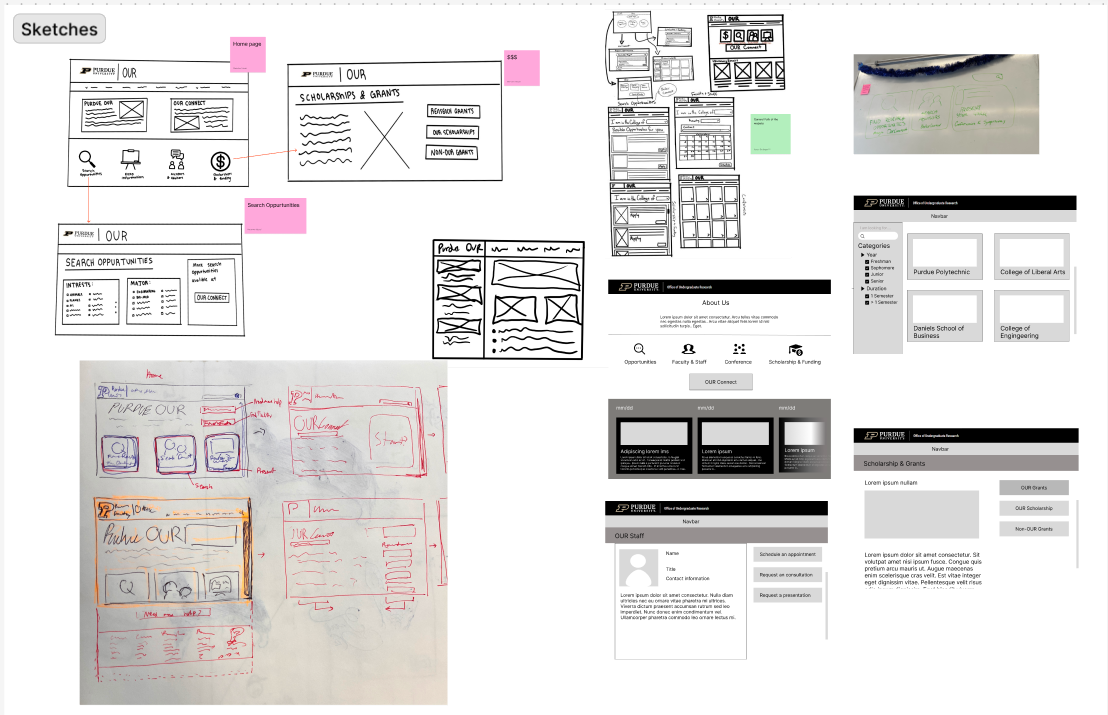
The prototype team interpreted the user flow into low-fidelity screen sketches across the core areas of the site: homepage, search, conferences, scholarships & grants, staff, and FAQ/help.
- Homepage - 3-4 prominent buttons became “starting points” that mirror the new flow, plus a clear entry into OURConnect.
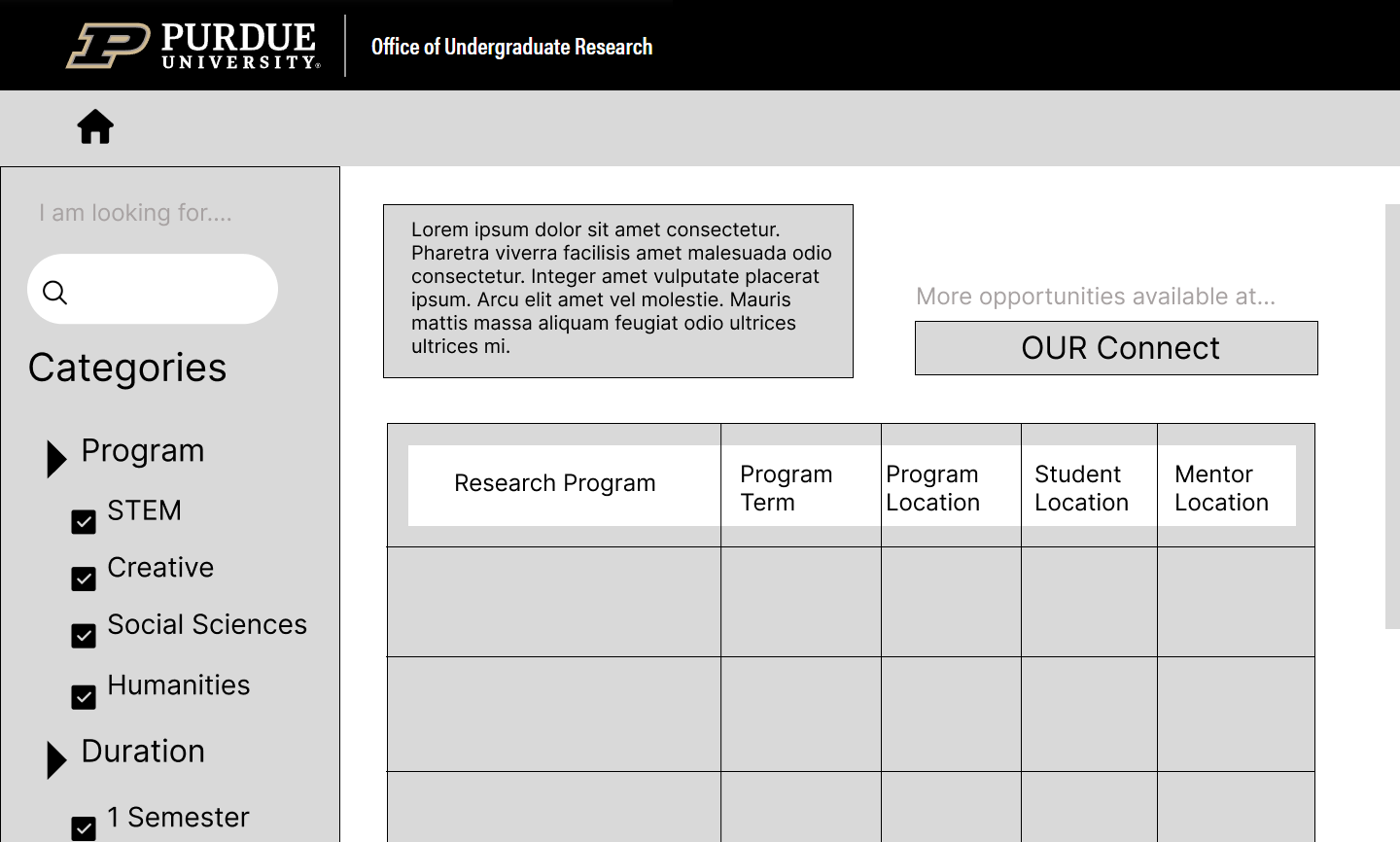
- Search Opportunities - A filterable catalog centered on students’ mental models: topic, time commitment, department, and eligibility.
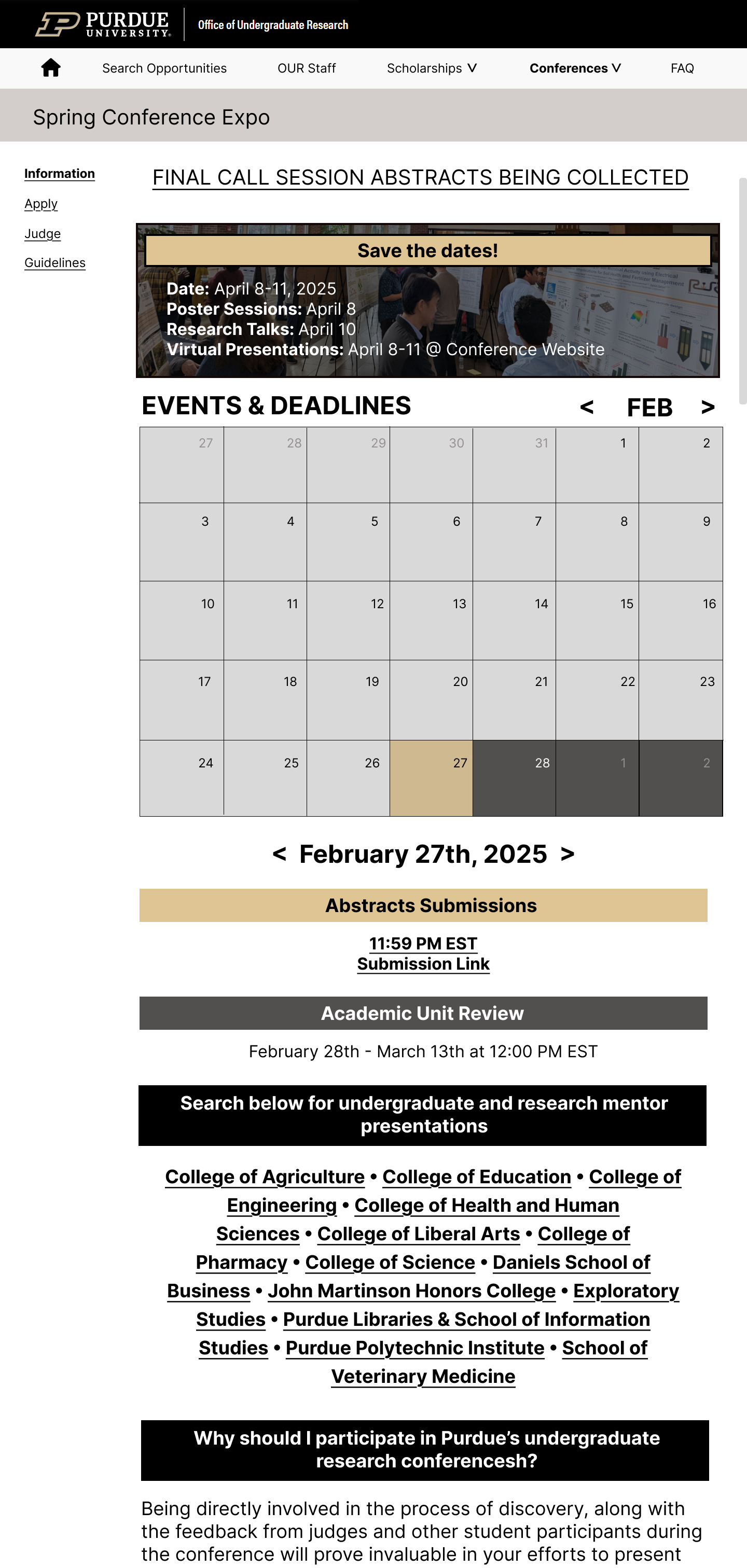
- Conferences - A calendar/grid layout surfaced dates, deadlines, and participation options at a glance.
- Scholarships & Grants - Dense text was broken into scannable cards explaining differences between funding types.
- OUR Staff - Direct contact and appointment options reduced friction for students seeking one-on-one guidance.
- FAQ & Help - Consolidated common questions to reduce unnecessary page-hopping and scrolling.
We validated these sketches with 5 undergraduates and 1 graduate student to confirm whether layout and labels matched their expectations.
Low-Fidelity Prototype & Testing
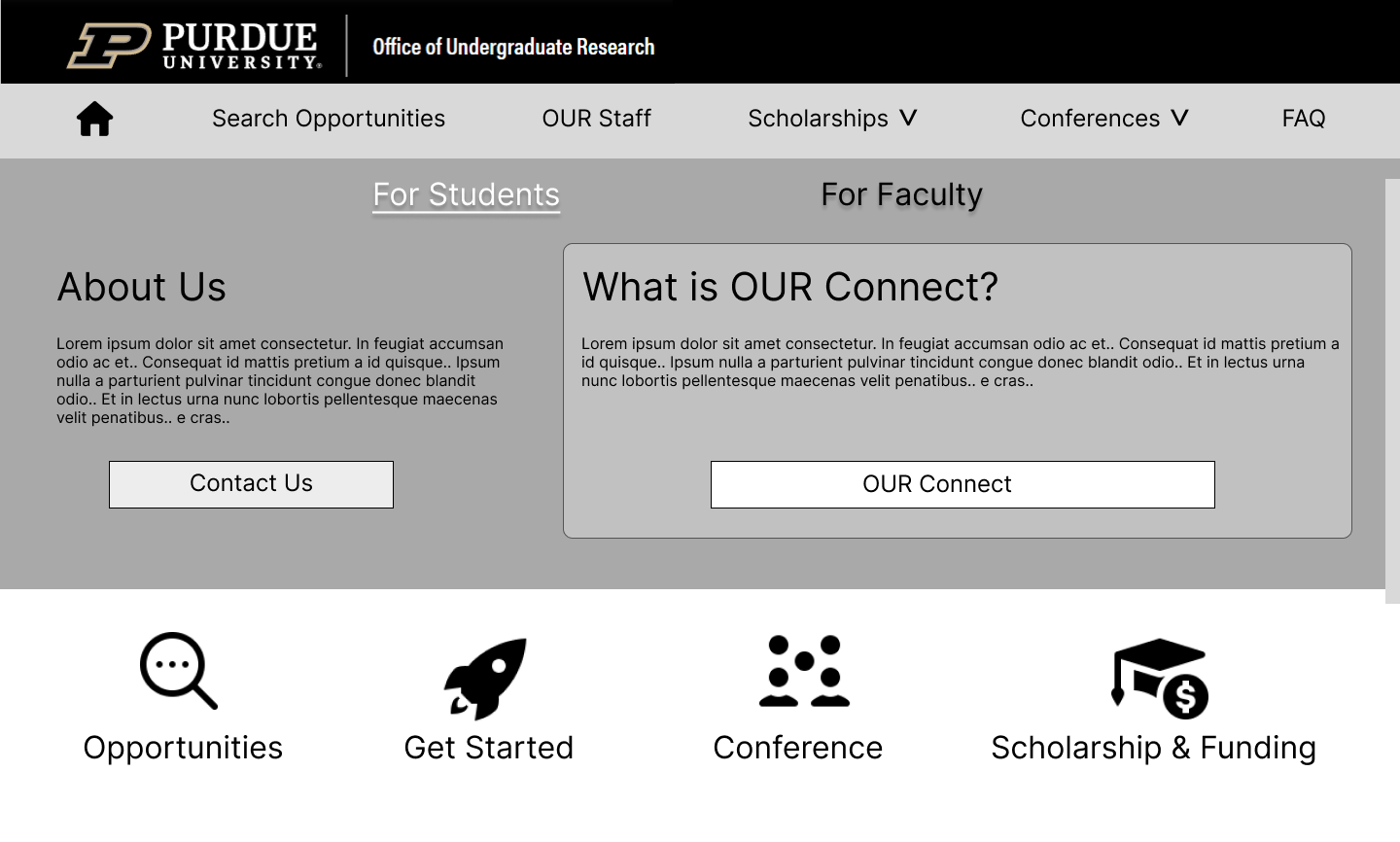
Using our validated sketches, we built an interactive low-fidelity prototype that followed the new user flow from entry point to opportunity discovery.
We then asked 5 undergraduate students with little to no research experience to complete tasks that mirrored the printed pathway, such as:
- Find a research opportunity aligned with your interests.
- Locate information on conferences and how to attend.
- Figure out what to do if you’re completely new to research.
Students reported that the new prototype was clearer and easier to navigate than the current OUR website. They especially appreciated seeing their next step and having multiple ways to get help.
Iterating on Help & Guidance
Testing also revealed gaps:
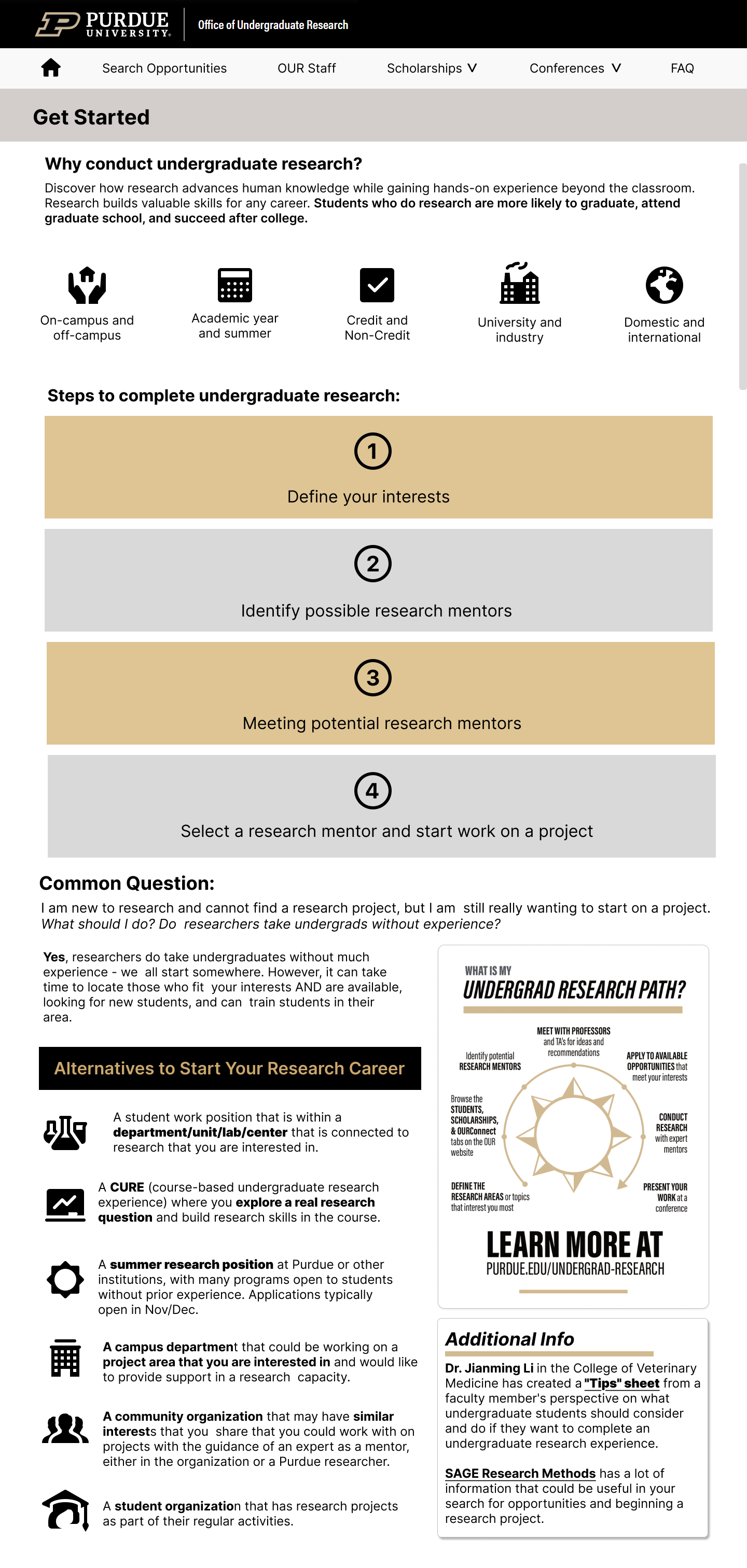
- Students wanted a dedicated “Getting Started” page that walked through the research process in plain language.
- Conference pages needed clearer explanations of applying vs. attending and what each required.
- Help content was too hidden in the navigation; students wanted support surfaced alongside primary tasks.
Mid-Fidelity Refinement
We incorporated feedback into a mid-fidelity prototype aligned with Purdue’s branding:
- Added a “Getting Started” page with step-by-step visual guidance for new researchers.
- Reworked the Spring Conference page to support both presenters and attendees, with dates and deadlines called out visually.
- Clarified copy and structure across funding, opportunities, and help pages.
Additional usability testing showed that the revised flow felt intuitive and stable; no major structural changes were requested, which allowed us to focus on content clarity and interaction polish in the high-fidelity prototype.
Final Prototype
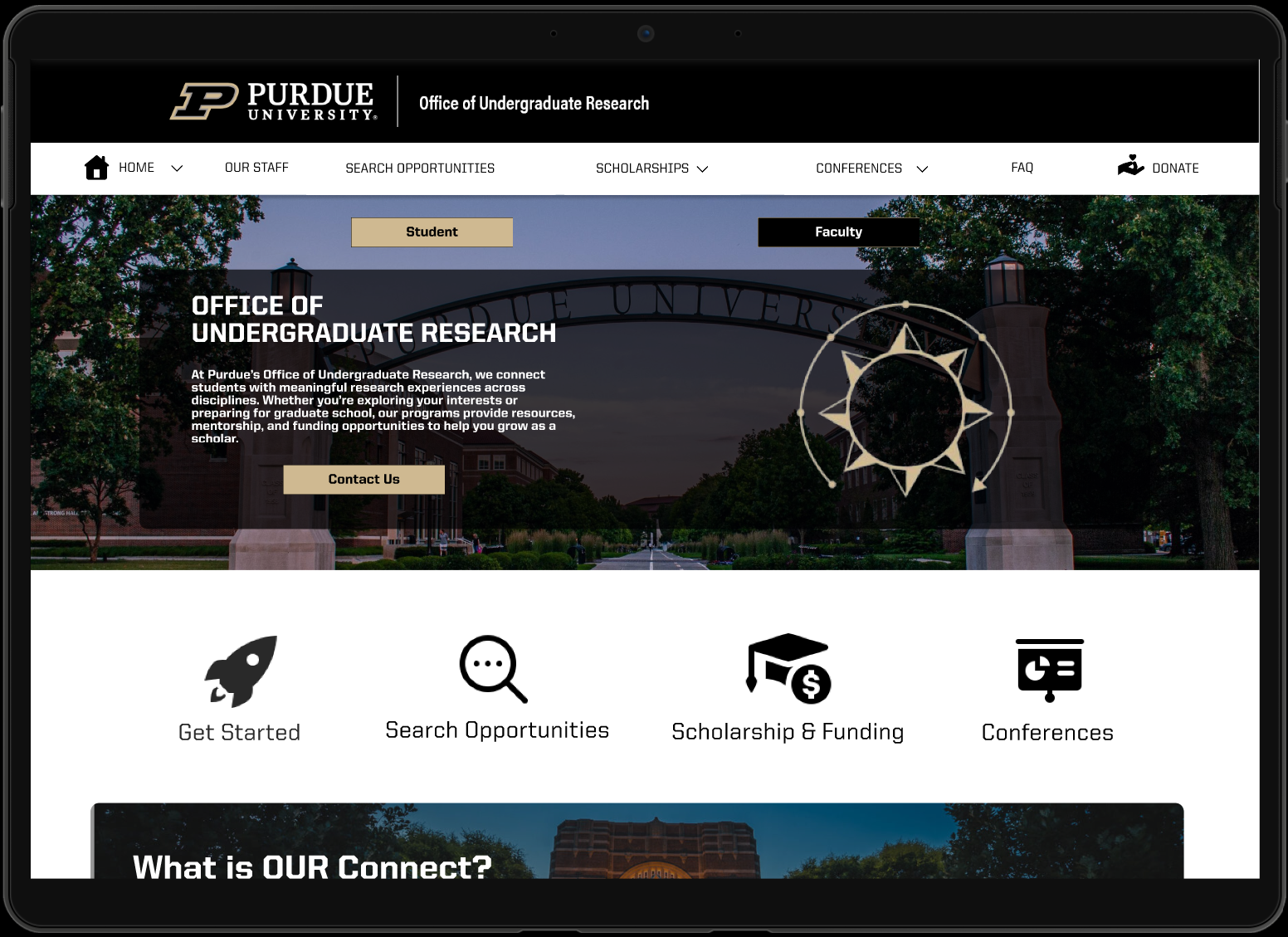
The final high-fidelity prototype combined our research insights, user flows, and branding constraints into a cohesive student-centered experience. Key improvements included:
- Guided entry points that align with different student intentions.
- Clear opportunity discovery through filters, structured listings, and consistent project information.
- Accessible support via surfaced help content, “Getting Started” guidance, and staff access.
- Conference and funding clarity with streamlined paths for both new and experienced researchers.
Process & Collaboration
Research Activities
- User Interviews - 11 undergraduate and 3 graduate interviews to uncover pain points, motives, and preferences when navigating the Purdue OUR website.
- Current State Testing - Task-based usability sessions on the existing OUR site to observe real navigation patterns and identify breakdowns.
- Comparative Analysis - Evaluation of peer university research sites to benchmark layouts, entry points, and opportunity catalogs.
- Co-Design Workshop - Collaborative ideation with students where they sketched and discussed their ideal research pathway.
- User Testing - Iterative testing on low- and mid-fidelity prototypes to validate flows, content hierarchy, and interaction patterns.
- Literature Review & Background Research - Current state of undergraduate research participation, Purdue branding guidelines, and the process of completing undergrad research.
Iteration & Design Activities
- Sketching & Ideation - Early sketches translating research insights into potential layouts and entry points.
- Journey Mapping - Mapping how students move through the undergraduate research path, including emotions, questions, and decision points.
- Low-, Mid-, and High-Fidelity Prototyping - Progressively refining flows and UI using Figma, from rough wires to production-ready visuals.
- Task Flow Annotations - Documenting each step of the guided pathway in the high-fidelity prototype to explain design rationale to our sponsor.
- Feedback & Iteration Sessions - Recurring critique cycles across Milestones 1-3 to align Team A (Prototype) and Team B (User Task Flow).
Tools
- FigJam & Miro for affinity diagramming, journey mapping, and co-design workshops.
- Figma for wireframing, prototyping, and design system exploration.
- Google Docs for project planning, protocols, and design documentation.
- Purdue Branding Guidelines to keep the redesigned experience visually and tonally aligned with Purdue’s identity.
- Purdue OUR Resources (e.g., current site and pathway print) as source material to ensure a seamless transition from paper to web.
Reflection
This project reinforced that pathways are lived, not just diagrammed. A beautiful infographic can break down the process on paper, but if the website doesn’t reflect how students actually move, they will still feel lost.
- Multiple entry points are essential. Students at different stages of experience and confidence need tailored on-ramps into the same ecosystem.
- Research-to-design traceability matters. Our annotated flow helped stakeholders see exactly how each interaction was grounded in user evidence.
- Support is part of the product. Surfacing help, staff, and “what to do next” is as important as listing opportunities.